
Restaurant Closing Tasks: The Hidden Work That Exhausts Chefs After Service
When the Kitchen Closes, the Work Doesn’t
For many chefs, the end of dinner service is not the end of the workday. The last plate may leave the pass at 10:30 p.m., but the real restaurant closing tasks often begin after the guests are gone.
The adrenaline from service fades quickly. What replaces it is paperwork, inventory counting, supplier orders, and next-day menu planning. A chef who has already worked 10–12 hours suddenly finds themselves alone at a desk surrounded by invoices, scribbled stock notes, delivery slips, and a laptop with too many spreadsheets open.
This part of the job rarely appears in culinary school brochures. Yet it’s one of the biggest operational pressures in professional kitchens.
The Reality of Restaurant Closing Tasks for Chefs
Once the kitchen shuts down, chefs typically face a series of operational tasks that keep them working long after the team has left.
Common closing responsibilities include:
• checking remaining stock in fridges and dry storage
• reviewing ingredient usage from the day’s service
• verifying supplier invoices and delivery slips
• updating spreadsheets or handwritten stock logs
• placing orders for next-day deliveries
• adjusting menus based on available ingredients
• preparing prep lists for the morning shift
None of these tasks are inherently difficult. The problem is when and how they happen.
They are often done late at night, after a physically demanding service, when fatigue is at its highest. Decisions about purchasing, menu changes, or ingredient substitutions are made when concentration is already low.
Over time, this creates a pattern: chefs working extremely long days that extend far beyond the visible hours of service.
Fatigue Creates Expensive Mistakes
When restaurant closing tasks are handled under exhaustion, mistakes become almost inevitable.
A chef reviewing invoices at midnight might overlook a pricing discrepancy from a supplier. A rushed stock check might miss items that are nearly depleted. An order placed late at night might include ingredients already sitting in the walk-in.
These errors often fall into several categories.
Over-ordering
Fatigue makes it harder to remember exact stock levels. Chefs often compensate by ordering extra “just in case.” This leads to:
• higher food costs
• excess inventory
• increased spoilage risk
Under-ordering
The opposite problem also occurs. If stock levels are misread, key ingredients might run out during the next service, forcing last-minute substitutions or emergency purchases.
Both scenarios affect menu consistency and profitability.
Supplier mistakes going unnoticed
Late-night invoice checks are rarely thorough. Pricing errors, missed discounts, or incorrect quantities can easily slip through when a chef is mentally drained.
Posts like
/blog/a-faster-way-to-handle-restaurant-supplier-ordering-and-track-discounts
explore how common supplier pricing inconsistencies can be in manual ordering systems.
The Mental Load of Next-Day Menu Planning
Another hidden burden of restaurant closing tasks is menu planning.
Chefs must often think ahead to the next day while also reviewing what happened during service. Questions pile up quickly:
• Which ingredients are running low?
• What must be used before it expires?
• What deliveries arrive tomorrow?
• Can any specials be adjusted to reduce waste?
These decisions are important for controlling costs and maintaining quality. But making them at the end of a 12-hour shift is far from ideal.
Many kitchens still rely on handwritten prep lists, scattered supplier emails, and spreadsheets that are difficult to update quickly. The result is a slow, fragmented planning process.
Some kitchens are beginning to experiment with AI-supported tools that connect inventory and menu decisions. For example, systems discussed in
/blog/ai-menu-planning-for-restaurants-how-chefcook-helps-chefs-create-smarter-menus
show how ingredient availability can automatically influence menu planning.
The goal is simple: reduce the number of decisions chefs must manually process late at night.
Paper, Spreadsheets, and Fragmented Systems
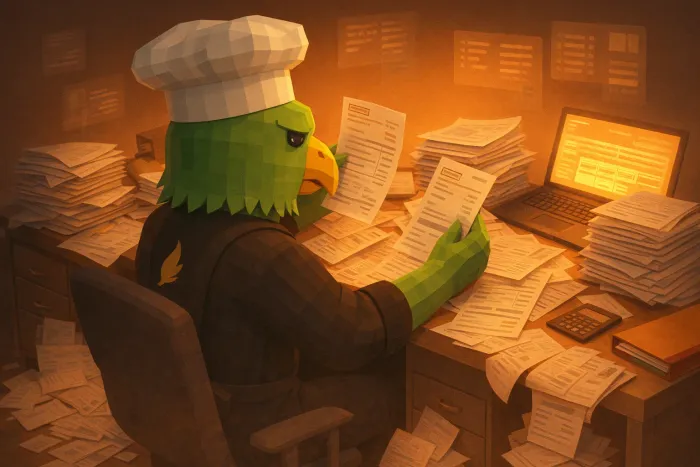
A typical chef’s closing desk often looks the same: invoices stacked in uneven piles, supplier delivery notes clipped together, and multiple spreadsheets open on a laptop.
This fragmented workflow creates several operational problems.
First, information is scattered. Stock counts may live on paper sheets, orders in emails, and supplier pricing in separate documents.
Second, tasks are repetitive. Chefs frequently rewrite the same information across different systems.
Third, tracking historical data becomes difficult. If someone wants to understand ingredient usage trends or supplier performance, the information is rarely centralized.
All of this adds unnecessary friction to restaurant closing tasks.
The Human Cost Behind the System
While operational inefficiencies increase food costs, the bigger issue is often human fatigue.
Professional kitchens already demand long hours and high physical intensity. When chefs must also carry the administrative load of inventory, ordering, and planning late at night, burnout becomes more likely.
The result can include:
• reduced decision quality
• declining job satisfaction
• increased staff turnover
• higher operational mistakes
Ironically, these are not culinary problems. They are workflow problems.
Most chefs entered the profession to cook, lead teams, and create memorable dining experiences—not to spend late nights reconciling invoices and rewriting stock sheets.
Rethinking the End of the Day
Restaurant closing tasks will always exist. Kitchens must know their inventory, manage suppliers, and plan menus.
But the way these tasks are handled matters.
When operational systems are fragmented, chefs absorb the complexity themselves. The work spills into late-night hours and turns the end of the day into another stressful shift.
Better systems can shift that burden away from individuals by connecting inventory, supplier ordering, and menu planning in one place.
The result is not just fewer spreadsheets or fewer papers on a desk. It is a kitchen where chefs can finish service, close the day efficiently, and actually leave the restaurant when the doors close.
Written by
Kitchen Crew
Tips and guides for kitchens that would rather cook than write supplier emails.
Related Articles
You might also find these useful
AI Menu Planning for Restaurants: How ChefCook Helps Chefs Create Smarter Menus
Discover how ChefCook assists chefs with creative menu planning using past specials, bestsellers, and AI-powered brainstorming.
A Faster Way to Handle Restaurant Supplier Ordering and Track Discounts
Restaurant owners can save hours each week by simplifying supplier ordering and tracking discounts across vendors in one place.